
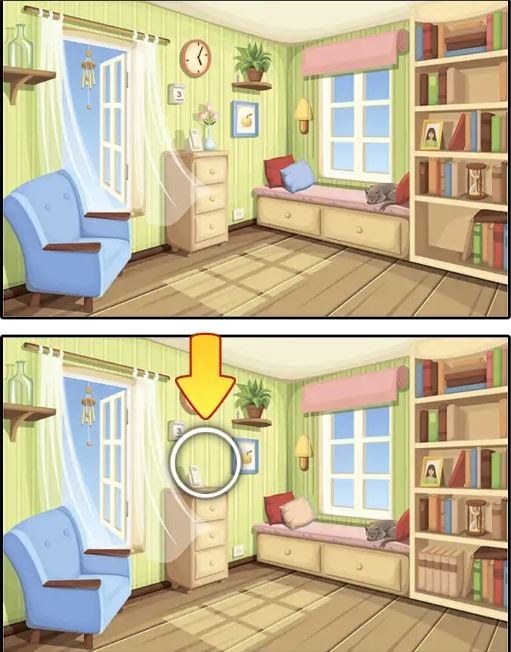
First Minute: Quiet, Then a Little Panic I opened Find Differences expecting a gentle warm-up. The first screen is uncluttered — two nearly identical photographs side by side, a timer counting up in the corner, and a sof
First Minute: Quiet, Then a Little Panic
I opened Find Differences expecting a gentle warm-up. The first screen is uncluttered — two nearly identical photographs side by side, a timer counting up in the corner, and a soft ticking sound if you leave your sound on. For about twenty seconds I felt clever, tapping the obvious stuff: a missing window shutter, a different-colored scarf, a lamppost that had vanished from the right image. Then I hit the third difference and just… stalled. My eyes flicked back and forth like I was watching a tennis match in fast-forward. The timer kept climbing, and I realized this wasn't a pure relaxation game. There's a low-grade tension baked in, especially once you notice the mistake counter sitting there, waiting for you to get sloppy.
You can play it free in your browser, no download or sign-up, which makes it easy to treat as a five-minute palate cleanser between other things. But the first minute tells you whether you're in the mood for visual scanning or not. If squinting at subtle hue shifts sounds exhausting right now, close the tab. If your brain perks up at the idea of hunting for tiny deceptions, you'll probably settle in nicely.
What You're Actually Doing for Fifteen Minutes
The loop is straightforward. Each level presents two images. You tap or click on the spot in either image where something is missing, altered, or added. Find all differences — usually five to seven per scene — and you move to the next picture. Miss too many times, and depending on the mode you might lose a life or trigger a cooldown. The game doesn't explain this penalty system overtly, which is probably intentional. You learn by failing.
What you're optimizing for isn't really score, because the score is just a reflection of speed and accuracy combined. What you're actually chasing is a clean run: low mistakes, fast spotting, no hint usage. Hints exist — a little magnifying glass icon that pulses when you're stuck — but using one feels like admitting defeat. I found myself hoarding them, then forgetting they were there, which tells you the difficulty curve is tuned to make hints feel optional rather than essential.
The scenes rotate through standard spot-the-difference fare: cluttered living rooms, busy street markets, nature shots with lots of foliage, holiday-themed setups if you stick around long enough. None of it is groundbreaking, but the art is clean and the differences are placed with a decent mix of obvious and sneaky. You'll get the beginner-friendly stuff — a whole object missing — alongside the maddening subtle ones: a slight color shift on a background element, a book spine that's thinner in one image, a shadow that points the wrong direction. Those are the ones that eat your time.
Mistakes That Will Tank Your Run
I wasted a good three minutes on one level because I kept tapping the same general area, convinced something was off with a patterned rug. There was nothing wrong with the rug. The actual difference was a missing teacup on a shelf above it, and my tunnel vision had locked me onto the wrong detail completely. This is the most common trap: fixating on a complex area and assuming the difference must be buried there, when it's often somewhere plainer nearby.
Another run-ender: tapping too fast. The game registers mis-taps, and if you're the type who gets jittery and starts poking at anything that looks vaguely suspicious, you'll rack up mistakes quickly. I learned to pause my finger half an inch from the screen and confirm before committing. Sounds obvious, but under the subtle pressure of that climbing timer, restraint evaporates.
Zooming out mentally matters too. I caught myself scanning in a rigid left-to-right pattern, like reading a book, and missing differences that sat right on the edges of the frame. The game likes to tuck changes near borders — a missing leaf on the outermost branch, a slightly cropped sign on the far right. If you don't consciously sweep the perimeter every time, you'll burn minutes circling back.
Finally, don't ignore color temperature. Some differences aren't about objects at all; they're about a slight tint change across a whole section. One level had a window where the glass panes shifted from warm afternoon light to a cooler overcast tone. It took me forever because I was looking for missing objects, not atmospheric changes. Once you train your eye to notice "this whole patch feels different," you'll catch those faster.
Phone vs Desktop: The Experience Splits
I tested this on both a laptop and a mid-range phone, and the differences matter more than you'd expect for such a simple game. On desktop, the larger screen is an obvious advantage. You can see both images at full size without scrolling, and the mouse cursor is precise. Tapping with a mouse feels deliberate. Mistakes drop because you're not accidentally grazing the screen. If you want to set personal best times or play seriously, desktop is the way to go.
On mobile, the images shrink to fit, which makes fine-detail differences genuinely harder to spot. You can pinch-zoom, but the gesture isn't always smooth, and zooming in means you lose the side-by-side comparison momentarily. I found myself zooming, forgetting what I was looking for, zooming out, and repeating the cycle. It's playable, and for casual couch sessions it's fine, but expect slower times and more squinting. The touch targets also feel a little generous, which is good for tapping but bad for precision — I occasionally triggered a mis-tap when my finger brushed the screen during a zoom attempt.
One small thing: if you're on a phone with a notch or dynamic island, check that it isn't obscuring the top edge of the images. I lost a difference once because a sliver of the picture was hidden behind the front camera cutout. Rotating to landscape fixed it, but the game doesn't prompt you to do that.
A Short Practice Plan If You Want to Get Good
You don't need a rigid training regimen for a spot-the-difference game, but if you're the type who enjoys seeing improvement, here's what worked for me after about twenty minutes of deliberate practice.
Warm up with three rapid levels, no hints, no pausing. Don't worry about mistakes yet. Just get your eyes used to the scanning rhythm. This takes maybe five minutes. The goal is to shake off the initial sluggishness where your gaze keeps snagging on irrelevant details.
Then spend ten minutes on a single harder level. Pick one where you struggled earlier. Force yourself to articulate what's different out loud, even if you're alone. Saying "the vase on the left is shorter" or "the curtain tieback is gold instead of silver" locks the difference into your brain differently than just tapping it. You're building a mental checklist of categories to scan for: object presence, size, color, orientation, text changes, shadow direction, reflection accuracy.
Finish with a speed round where you allow yourself exactly two minutes per image. If you haven't found all the differences by the two-minute mark, use a hint and move on. This prevents you from reinforcing the habit of staring fruitlessly at one stubborn area. The timer constraint forces you to trust your first impressions and keep your eyes moving.
Do that cycle two or three times a week, and you'll notice your average completion times dropping. More importantly, you'll start catching those sneaky edge-of-frame differences before they become time sinks.
Who Should Actually Skip This
If you have any kind of eye strain issues or visual processing sensitivities, be cautious. The high-contrast scenes and the rapid back-and-forth eye movement gave me a mild headache after about twenty-five straight minutes. I wouldn't call it an accessibility fail — the images are clear, and there's no strobe or flash — but the visual load is real. Take breaks. Blink. Look at something far away between levels.
Also, if you need a sense of progression or narrative to stay engaged, Find Differences will feel hollow. There's no story, no unlockable gallery, no character arc. It's a pure mechanical exercise. That's not a flaw; it's just what the genre is. I found it satisfying in the way a crossword or a Sudoku puzzle is satisfying — a contained challenge that resets each time. If you want a game that builds toward something, this isn't it, and that's fine.
The Honest Verdict
Find Differences does exactly what its name promises, cleanly and without friction. It loads fast, plays smoothly, and doesn't try to upsell you or bury the core loop under menus. For a free browser game, that's rarer than it should be. The difficulty wobbles a bit — some levels feel trivially easy, others spike into frustration — but that unevenness kept me on my toes more than a perfectly smooth curve would have.
I'll keep a tab open for it. Not as a main game, but as a mental reset between writing tasks or when I need to stare at something that isn't text. It's good for that. If you're looking for a quick visual puzzle that respects your time and doesn't demand tutorials or logins, give it fifteen minutes. You'll know by the third level whether the scanning rhythm clicks for you or just makes you want to rub your temples.



