
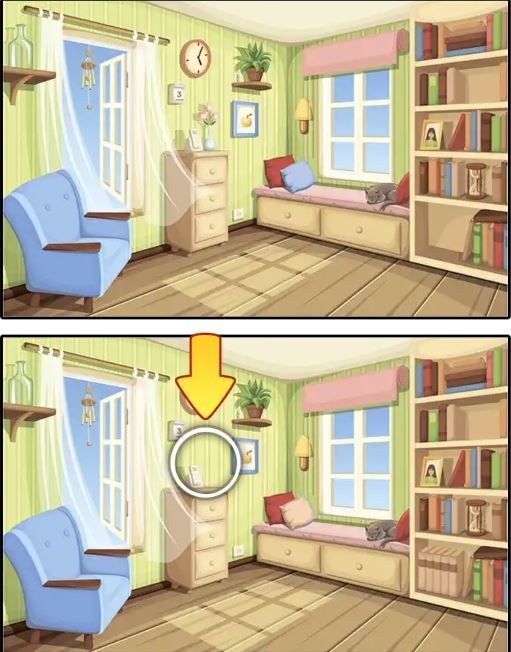
I fired up Find Differences expecting a gentle spot-the-difference diversion — the kind of thing you play while half-watching a show. Within forty seconds I was squinting at my monitor, mouse pointer hovering between two
I fired up Find Differences expecting a gentle spot-the-difference diversion — the kind of thing you play while half-watching a show. Within forty seconds I was squinting at my monitor, mouse pointer hovering between two nearly identical living room scenes, genuinely unsure if that lamp had always been missing a stripe. The first minute has a specific rhythm: the side-by-side images load, a subtle musical loop kicks in, and your cursor changes the instant you brush over a valid difference. There's no hand-holding tutorial popup, just the clean assumption that you know what to do. That confidence is refreshing.
The core loop is tighter than you'd expect
Each level presents two versions of the same illustration — a cluttered kitchen, a busy street market, a child's bedroom with toys scattered everywhere. Your job is to click on the spots where the right image diverges from the left. You have a set number of differences to find, usually five or seven depending on the scene. A thin progress bar at the top tracks how many you've located. When you click correctly, a soft chime plays and a subtle circle briefly highlights the changed area. Click wrong, and you lose a life. Lose all three lives and the level resets. The game isn't punishing for the sake of it, but it does ask for actual attention.
What you're really optimizing for here is scanning efficiency. Early levels let you rely on obvious color swaps — a red book becomes blue, a character's hat vanishes. By the tenth scene, the changes get sneakier. An object might shift a few pixels to the left. A shadow lengthens. A reflection in a window contains a figure that wasn't there before. The game trains you to stop looking at the "subject" of the image and start studying edges, negative space, and background details that artists normally use as filler. I caught myself developing a zigzag eye movement pattern without meaning to, left image to right image, top to bottom, like a manual printer head.
What the game doesn't tell you in the first five minutes
Find Differences doesn't explain its timer system, and that's worth knowing before you settle in. A countdown clock sits in the corner, typically sixty to ninety seconds per scene. If the clock hits zero, you don't automatically fail — instead, the game docks one of your lives and resets the timer. This means you can technically outlast a level by absorbing life losses, but the math gets ugly fast. Lose two lives to the clock and you're one misclick away from restarting the entire scene. The real skill curve isn't just spotting differences; it's learning when to stop staring and take a calculated guess before the timer punishes you.
There's also a hint button, usually represented by a magnifying glass icon. You get a limited number of hints across your session — I counted three before they stopped refreshing between levels. A hint doesn't solve a difference outright. Instead, a faint shimmer briefly encircles the general region where a remaining difference sits, leaving you to pinpoint the exact pixel. I burned my first hint on a scene where a window curtain's fold pattern differed by maybe eight pixels. The shimmer narrowed my search area from the entire screen to a palm-sized zone, but I still had to lean in and compare fold by fold. Hints feel balanced; they prevent rage-quitting without trivializing the puzzle.
Mistakes that will end your run early
The most common way to crash out isn't missing a difference — it's clicking too fast once you find one. After a correct click, the game briefly locks your input, maybe a quarter-second. If you double-tap or click again during that window, nothing registers. But if you click a fraction too late while already moving to another suspected spot, the game reads it as a fresh click on whatever your cursor lands on. I lost two lives in a single level by clicking a lamppost shade that looked slightly off but was identical in both images. The difference was actually the window frame two inches to the left. My eyes saw the right thing; my mouse hand had momentum.
Another trap: assuming differences are always additive or reductive. Some scenes play with scale. A framed photo on a wall might be 10% larger in the right image. A rug's pattern could be rotated 90 degrees. Your brain processes these as "same object, different detail" if you're scanning for presence or absence. I spent forty seconds on a bakery scene convinced the croissant count was wrong. The actual difference was that a hanging menu board had been subtly stretched horizontally, making the text spacing uneven. Once I saw it, I couldn't unsee it, but the delay cost me a life and forced a panicked final thirty seconds.
Don't ignore the edges of the frame. I learned this the hard way on a forest scene where a tree branch in the extreme upper-right corner was missing a single leaf cluster. The branch barely registered as part of the composition — it felt like decorative vignetting. Differences that live in the outermost 5% of the image are disproportionately responsible for timer deaths because your scanning patterns tend to center on the focal point. Train yourself to trace the border of each image first, before diving into the middle.
Phone versus desktop: they're not the same game
I played on both a 15-inch laptop screen and a mid-size phone. The experience splits in meaningful ways. On desktop, you have cursor precision. You can hover over suspicious areas without committing. That hover state — where your pointer icon changes to indicate a clickable zone — essentially acts as a free verification tool. If the cursor doesn't change, you know not to click. This turns careful play into a low-risk scanning method: sweep the cursor across the image, watch for icon shifts, then click when you're confident. It's not cheating, but it does make the game feel more like a methodical investigation.
On a phone, touch input removes that safety net. Your finger is the cursor and the click simultaneously. You can't hover. Every tap is a commitment, and fat-fingering a busy scene — like a market stall packed with fruit — becomes a real hazard. I misclicked three times on a single mobile level because the difference was a small price tag alteration and my thumb obscured the exact spot I was trying to check. The mobile version compensates slightly by letting you pinch-zoom, which desktop lacks in most browser implementations. Zooming in on a crowded bookshelf to compare individual spine titles feels natural on mobile and almost necessary. If you're serious about clearing levels without hint reliance, phone play demands more patience but rewards it with a tactile closeness to the artwork.
Load times varied. On desktop with a stable connection, levels transitioned in under two seconds. On mobile over cellular, I occasionally sat through five-second loads between scenes. Not dealbreaking, but it disrupts the flow when you're in a groove. If you're commuting with spotty signal, maybe stick to shorter sessions or expect the occasional pause that breaks your scanning rhythm.
A practice plan that takes about twenty minutes
If you want to stop losing runs to the same three mistakes, here's a focused way to spend a session. This isn't a "grind for hours" prescription — it's a short, repeatable loop that sharpens specific observation muscles.
Start with five minutes of what I call edge-only scanning. Pick any early level — something with a simple room interior works best. Before you click anything, spend a full minute tracing the absolute perimeter of both images with your eyes. Left edge, top edge, right edge, bottom edge. Note every object that touches the frame. Only after that complete circuit do you allow yourself to look inward. The goal isn't to finish the level fast; it's to build the habit of checking boundaries before focal points. Repeat with a second scene. By the third, you'll notice your eyes automatically flick to the corners on level load. That's the reflex taking hold.
Next, dedicate ten minutes to playing without using the cursor-hover trick (on desktop) or zoom (on mobile). Force yourself to rely purely on vision, no input assistance. This will feel wrong at first. You'll want to sweep the mouse to verify suspicions. Don't. Make your best visual call, click, and live with the consequences. The point is to calibrate your confidence. You'll quickly learn which types of differences you spot reliably — color changes, missing objects — and which ones fool you — scale shifts, shadow alterations. That self-knowledge lets you budget time later: if you know you're weak on shadow differences, you can allocate extra seconds to checking light sources when the timer gets low.
For the final five minutes, play one level repeatedly until you can clear it with zero mistakes and at least thirty seconds left on the clock. Choose a mid-difficulty scene, not the easiest one. Memorization is part of the exercise, but the deeper skill is pattern recognition. After three or four attempts on the same image, you'll start noticing how the artist hides changes — a tendency to alter background elements rather than foreground characters, a preference for color desaturation over outright removal. Those tendencies carry across levels because the art style is consistent. You're not just learning one scene; you're learning how this specific game thinks.
A few things you'll figure out after a dozen levels
The music doesn't loop seamlessly, and the silence between tracks is just long enough to make you glance at the timer. I found this annoying until I realized it served as an unintentional pacing cue — when the music drops, you've been at it long enough that your concentration is probably fraying. Use that gap as a reminder to blink, unclench your jaw, and refocus.
Differences are never hidden behind UI elements. The timer, life counter, and hint button occupy fixed screen real estate, and no change ever occurs underneath them. If you're hunting for the last difference and it's not in the visible area, it's not tucked behind the score bar. This sounds obvious, but in frantic moments I've caught myself squinting at corners partially obscured by interface chrome. The game plays fair.
You can play Find Differences entirely in your browser for free — no download, no account wall. It's one of those HTML5 games that loads and runs without asking anything of you. That low barrier makes it easy to drop into a session during a break or while waiting for something to compile, render, or finish cooking. The lack of friction is the game's stealth strength; you'll play three levels, then notice twenty minutes vanished.



