
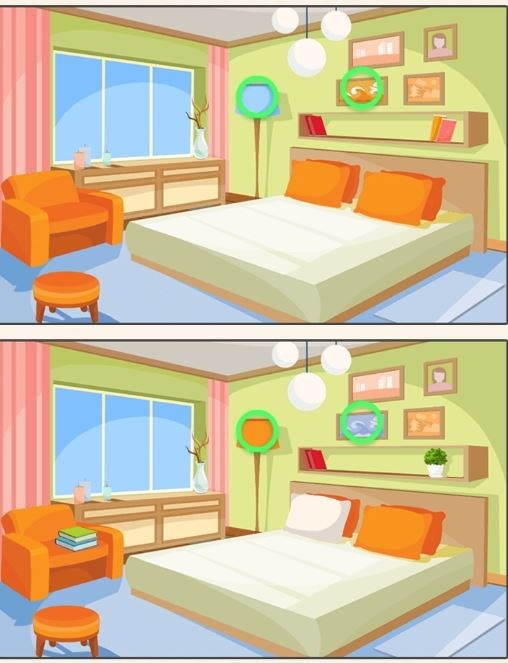
First Impressions: What the Timer Actually Feels Like You open Find A Difference and within three seconds you're staring at two nearly identical pictures. A small clock in the corner starts ticking down from something li
First Impressions: What the Timer Actually Feels Like
You open Find A Difference and within three seconds you're staring at two nearly identical pictures. A small clock in the corner starts ticking down from something like 90 seconds. My first thought was "this is a kids' game, I'll breeze through it." Fifteen seconds later I'm frantically tapping a cloud in the left image that definitely has an extra wisp, and the timer pressure suddenly feels very real. The early levels give you generous time and the differences are almost comically obvious — a missing chimney, a boat that changed color completely. You'll finish those with 40 seconds to spare and feel clever. Then the scene shifts to a cluttered market stall and you can't find the fifth difference anywhere, and that countdown starts feeling less like a suggestion.
The music, if you leave it on, is the kind of gentle looping tune that's designed not to annoy parents who hear it from across the room. I turned it off after ten minutes, not because it was bad, but because I needed total silence to spot a slightly different shade of green on a vegetable crate. The art is clean, colorful, and doesn't try to trick you with blurry edges or compression artifacts — a real problem in some browser-based spot-the-difference games where you're fighting the image quality as much as the puzzle.
The Core Loop: More Than Just Spotting
At its simplest, you tap anywhere on either image where you see a discrepancy. Tap correctly on the difference and it gets circled, a satisfying little chime plays, and your remaining differences counter drops by one. Tap wrong and nothing happens visually, but you've just burned a second or two. In the early going that penalty feels trivial. By level eight or nine, when you're down to fifteen seconds hunting one last difference, every wasted tap hurts.
What you're actually optimizing for isn't just accuracy — it's scan speed. Your eyes need to develop a system. Most players will naturally start in the top left and work right, row by row, like reading. That works fine until you hit a symmetrical image like a palace interior or a garden with repeating flower beds. Then your brain starts glossing over details because it assumes symmetry where differences hide. I found myself resetting my scan pattern constantly: sometimes I'd focus on color first (is anything a slightly different shade?), then shape, then presence/absence of objects. The game doesn't teach you this; you figure it out through failure.
Each successful find earns you points, and finishing a level with time left gives a time bonus that multiplies your score. This is where the game quietly separates casual play from score-chasing. You can muddle through most levels by just being patient, but if you want those three-star ratings, you need speed and precision together. The difference between one star and three stars on a single level might come down to whether you spotted the fourth difference in three seconds or twelve.
Levels and Difficulty Progression
Find A Difference doesn't exactly announce its structure, but from playing through a good chunk of it, the pattern is clear. The game serves up themed sets — a beach series, a kitchen series, a forest series — and within each set the difficulty climbs. The first image in a set is the tutorial in disguise: large, obvious differences, often only five to find. By the third or fourth image in that same theme, you're looking for eight or nine differences in a busier scene, and at least two of them will be the kind of thing that makes you mutter "you have got to be kidding me."
I hit my first real wall on a nighttime cityscape. The differences included a single window on a skyscraper that was lit instead of dark, and a star in the sky that had shifted by maybe three pixels. These are the moments where you either develop a strategy or start burning through hints. The game gives you a limited number of hints — typically three per session or per set — and using one highlights a circle around an unfound difference for a couple of seconds. It's enough to save you but not enough to carry you. I hoarded my hints obsessively and only used them when I was under twenty seconds with two or more differences remaining.
What Kills Runs Early: Concrete Mistakes
After about an hour of scattered play across two sittings, I started noticing the same patterns that ended my runs prematurely. The biggest one is fixation. You'll spot three differences quickly, feel great, then spend forty seconds staring at the same quadrant of the image convinced the last difference must be there. It almost never is. The moment you catch yourself tapping the same area repeatedly, you need to physically look away from the screen for two seconds, then come back fresh. I'm not being dramatic — that micro-reset genuinely saved several of my runs.
Another common mistake is tapping before you're sure. The game doesn't penalize wrong taps with a score deduction or a lockout, but it costs you time. In the final thirty seconds, when your heart rate is up and you're jabbing at anything that looks slightly off, you can easily burn five seconds on false taps. That's often the difference between clearing the level and watching the timer hit zero with one difference left. I learned to hover my finger over a suspected spot for a half-beat and really confirm before committing.
Eye fatigue is real and the game does nothing to warn you about it. After about twenty minutes of continuous play, my ability to distinguish subtle color variations dropped noticeably. A difference I would have caught instantly in minute three became invisible in minute twenty-three. If you're pushing for high scores or trying to clear a tough set, take actual breaks between levels. Not "check your phone" breaks — look at something far away, let your eyes refocus.
The hint system can also become a trap. Because hints are limited, you might convince yourself to save them for later levels. But if you're stuck on level four of a set with thirty seconds left and one difference to find, using that hint is the correct play. The levels don't get easier, and banking hints for a hypothetical harder level that you never reach because you failed this one is a losing strategy. I burned two hints early on a level I was stubborn about, then cruised through the next three levels without needing any. That's just how the difficulty curve works sometimes.
Phone vs Desktop: A Meaningful Difference
I played Find A Difference on both a laptop with a trackpad and on a phone. The experience isn't identical, and your choice actually matters for harder levels. On desktop, you get a larger view of both images simultaneously. You can see the whole scene without zooming or scrolling, which makes systematic scanning much easier. The mouse cursor is precise — you're not covering up a potential difference with your finger while you tap. For the later levels where differences shrink to near-pixel-hunt territory, desktop gives you a genuine advantage.
On mobile, the images are smaller and you'll likely need to zoom in on details, especially for levels with eight or nine differences. Pinch-to-zoom works fine and the images hold up well under magnification, but the act of zooming and panning eats time. You're also tapping with a finger that obscures the exact spot you're trying to check. I found myself using my pinky for precision taps, which looked ridiculous but worked. Mobile play is perfectly serviceable and honestly more convenient for quick sessions — waiting in line, killing five minutes — but if you're genuinely trying to three-star the back half of the game, play on a bigger screen.
One pleasant surprise: the free browser version I tested didn't throw ads between every level. There were occasional banner ads at the bottom of the screen, but they weren't intrusive and didn't pop over the images mid-play. Your mileage may vary depending on where you're playing, but the experience felt refreshingly uncluttered for a free HTML5 game.
A Short Practice Plan for Getting Better
If you want to improve without just grinding levels and hoping for the best, here's a focused approach I worked out over my sessions. It's not complicated, but it's specific.
Session one (15 minutes): Play the first three levels of any themed set. Don't worry about time at all. Your only goal is to practice a consistent scanning pattern. Start top left, move right in a slow sweep, drop down slightly, sweep left. Every time you find a difference, note where it was in your scan. Did you spot it on the left-to-right pass or the right-to-left pass? Most people have a dominant scan direction where they catch more. Figure out yours.
Session two (15 minutes): Replay those same three levels, but now race the clock. You already know where the differences are from session one, so this isn't about discovery — it's about training your tap speed and confirmation rhythm. Try to beat your previous time on each level. Pay attention to how quickly you can move from "I see it" to "I tapped it" without accidentally hitting the wrong spot.
Session three (20 minutes): Play five new levels without using any hints. Set a personal rule: if you're down to twenty seconds and have more than one difference remaining, you're allowed to fail the level and retry it. Use the failure as information. Where were you stuck? What part of the image did you ignore? On the retry, start your scan in that neglected area. This builds the habit of checking your blind spots first on unfamiliar images.
Ongoing: When you hit a level that feels genuinely unfair — and you will — take a screenshot if your platform allows it. Look at the two images side by side with no timer pressure after you've failed. Often you'll spot the difference immediately when the stress is removed, and that teaches you something about how your brain processes visual information under pressure. Next time, you might catch that type of difference faster.
Find A Difference isn't trying to reinvent the genre. It's a clean, competent execution of a classic puzzle format that works because the fundamentals are solid. The images are pleasant to look at, the difficulty ramps up at a reasonable pace, and the timer adds just enough tension without feeling sadistic. It's the kind of game you can play in a browser tab during a lunch break, feel briefly clever, and close without any lingering frustration — unless you're stuck on that one cityscape level. I'm still annoyed about that window.



