
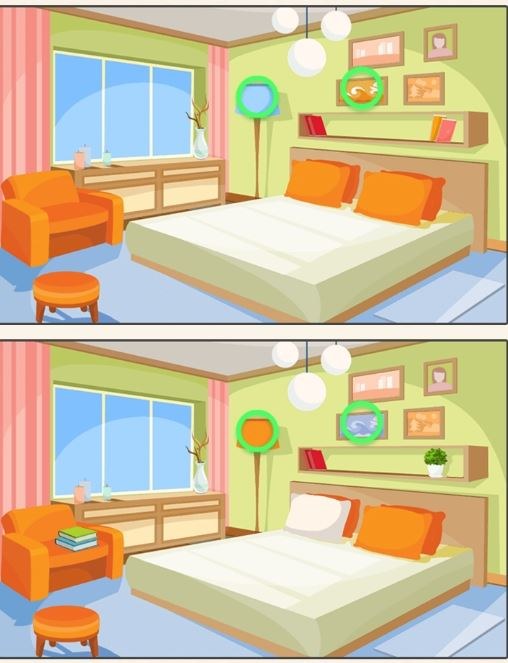
What the First Minute Actually Feels Like You open Find A Difference and immediately two nearly identical photos sit side by side. A timer starts counting up in the corner, not down, which I actually prefer because it re
What the First Minute Actually Feels Like
You open Find A Difference and immediately two nearly identical photos sit side by side. A timer starts counting up in the corner, not down, which I actually prefer because it removes that panicky "you're about to lose" pressure right away. The first difference I spotted was a missing flower pot in the right image. It took about eight seconds of scanning before my eyes caught it. That small dopamine hit when you tap the correct spot is surprisingly clean — no over-the-top particle effects or congratulatory pop-ups, just a subtle circle marking your find and the counter ticking up one notch. By the thirty-second mark I'd found three differences and started to understand the visual rhythm these images follow. The objects that change tend to sit in the middle ground, rarely hidden in corners or obvious dead-center focal points.
What surprised me was how quickly I developed a scanning pattern. Left to right, top to bottom, then a quick cross-check of color anomalies. You'll notice certain tells after a few rounds — a lamp that's suddenly a slightly different shade of beige, a book on a shelf that's facing the wrong direction. The game doesn't punish wrong taps with time penalties in most modes I tried, which keeps the mood exploratory rather than punishing. That said, wild tapping will eventually trigger a brief cooldown if you're just poking randomly. I discovered that about four minutes in when I got lazy on a particularly tricky kitchen scene.
The Loop and What You're Really Optimizing For
Find A Difference doesn't throw narrative at you. There's no story about why you're comparing these images, and honestly that works in its favor. The loop is pure: you get a scene, you find five to eight differences depending on difficulty, and then you move to the next pair. Completion percentage sits quietly at the top. What you're optimizing for shifts as you play longer. Early on it's just accuracy, but around the ten-minute mark I started caring about speed-per-find. Not because the game demands it, but because your brain naturally wants to beat its own pace.
Each scene has a fixed set of differences. They don't randomize on replay, which means memory starts creeping into your runs if you revisit levels. I don't mind this because it mirrors how actual observation skills work — you learn to anticipate where changes cluster. In one cityscape level, three of the six differences involved window details on the same building. Once I clocked that, future urban scenes had me checking windows first. The game trains you without tutorial boxes, which is the sign of clean design.
What you're really building is visual discrimination speed. The ability to hold two images in working memory and spot discrepancies transfers weirdly well to real tasks. After a twenty-minute session, I caught a typo in an email I'd read three times earlier. Not saying this game will change your life, but the mental warm-up is real. The free browser play aspect means you can jump in during a coffee break without downloads or account creation nonsense. Just open a tab and start comparing.
Mistakes That End Runs Early
Most runs don't end because you run out of time — they end because you hit a mental wall and start guessing. Here's where I see players (and myself, on my third attempt) tripping up:
- Fixating on one quadrant. Your eyes naturally gravitate to the area where you found the first difference. I lost a good thirty seconds on a beach scene staring at the left side where a missing seashell was, while a completely different colored umbrella sat untouched on the right. Force yourself to break zones after each find.
- Ignoring the edges. After about fifteen minutes I noticed a pattern: roughly twenty percent of differences live within a centimeter of the image border. A cropped-out fence post, a cloud that extends slightly differently at the top edge. Your peripheral vision dismisses borders as framing, but the game designers don't.
- Zooming out too far on desktop. On a larger monitor, the two images can sit far enough apart that your eyes can't compare them in a single glance. I'll get into device specifics next, but squishing a browser window too small introduces a different problem — details blur together and subtle color shifts become invisible.
- Not using the hint system wisely. Hints in Find A Difference typically highlight one remaining difference with a pulsing circle. The mistake is burning hints on early, obvious finds. Save them for the last one or two differences that you've been circling for over a minute. That final stubborn missing detail is where hints actually protect your run.
- Playing tired. This sounds obvious, but around the eighteen-minute mark my accuracy dropped noticeably. I started second-guessing finds I'd already confirmed, tapping the same spot twice. If you feel that hesitation creeping in, pause. The game doesn't punish tabbing away.
Device Notes: Phone vs Desktop Reality
I tested Find A Difference on both a 15-inch laptop screen and a mid-range Android phone. The experiences differ more than I expected.
On desktop, you have the luxury of seeing both images simultaneously at a comfortable size. The mouse cursor gives you precision — you can hover over a suspicious area in the left image, then flick your eyes to the right for comparison without committing to a tap. I found my accuracy was consistently higher on desktop, finishing most scenes with zero wrong taps. The downside: screen real estate can work against you if you maximize the browser window. I settled on keeping the game at roughly 70% of my screen width, which kept both images within my central field of view. Anything wider and my head started physically turning, which added milliseconds of refocusing time per scan.
On mobile, the images stack vertically by default in portrait mode, which changes everything. You scroll between the top and bottom image, relying heavily on visual memory rather than side-by-side comparison. This actually trained a different skill — I got better at holding a snapshot in my head. The pinch-to-zoom feature becomes essential. I developed a rhythm: scan the full top image once, zoom in on the bottom image and pan systematically, then zoom back out for a final cross-check. Thumb taps are less precise than mouse clicks, so expect occasional mis-taps on tightly clustered details. The game handles these gracefully, but they add up if you're going for a perfect run.
One quirk specific to mobile: notifications. Even a banner alert at the top of the screen briefly covers part of the image. I missed a difference for a full forty seconds because a text message preview sat exactly over a changed window shutter. Do Not Disturb mode is your friend here, though the game itself won't remind you.
Tab management matters on desktop too. I initially had music playing from another tab, and every time I alt-tabbed to change tracks, I lost my visual momentum. Keep Find A Difference in its own window, close other distractions, and treat it like a focused ten-minute session rather than background entertainment. You'll finish scenes faster and with less frustration.
A Short Practice Plan That Actually Works
After playing for the better part of an afternoon, I landed on a routine that improved my average find time from roughly twelve seconds per difference down to about seven. This isn't a speedrunning guide — it's just how to get comfortable enough that the game feels smooth rather than straining.
First five minutes: Ignore the timer completely. Pick a scene and deliberately scan every object, even after you've found all required differences. Verbalize what you see, quietly or in your head. "Bookshelf, three red books, a candle, a small clock." This builds a mental inventory habit that pays off later when you're comparing faster. You're not trying to find differences here — you're cataloguing the image.
Next ten minutes: Play normally but impose one rule: every time you find a difference, immediately move your eyes to the opposite side of the image for your next search. Found something on the left? Next scan starts hard right. This breaks the fixation pattern I mentioned earlier and widens your effective scanning area. You'll feel clumsy for the first few attempts, then it clicks.
Final five to ten minutes: Try a speed round where you allow yourself exactly two seconds per quadrant before moving on. Top-left, two count, top-right, two count, bottom-left, two count, bottom-right, two count. If you don't spot anything, move on and loop back. This prevents the tunnel vision that eats up minutes on a single stubborn element. You'll be surprised how often a difference you missed becomes obvious on the second loop.
Do this whole routine twice a week and you'll notice the game feeling genuinely smoother. Not because the levels are easier, but because your visual processing pipeline gets more efficient. The images don't change — your approach does.
The game rewards patience more than raw speed anyway. My cleanest runs happened when I stopped trying to be fast and just trusted the scanning pattern. Find A Difference isn't going to thrill you with plot twists or progression systems, but as a free browser game that sharpens observation, it does exactly what it promises. Keep your tabs minimal, your zoom level sensible, and your hints saved for that one infuriating detail you've stared at five times without seeing.



