
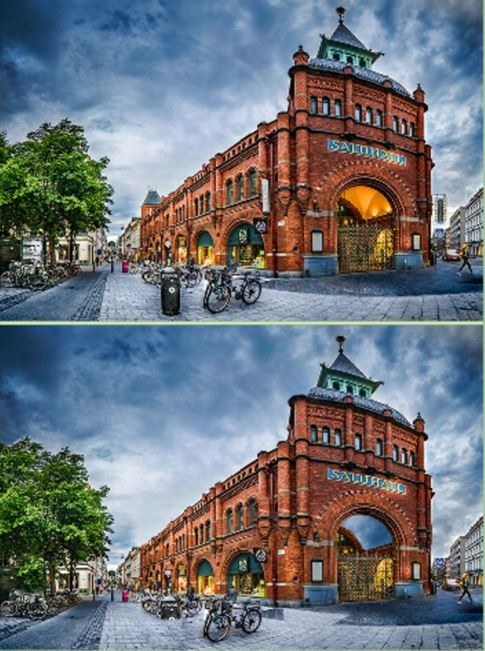
First Boot Feels Like a Sunday Paper Puzzle I loaded Findthedifferencebest on my phone expecting the usual blurry photo mess that plagues free browser difference games. Instead I got two crisp, side-by-side illustrations
First Boot Feels Like a Sunday Paper Puzzle
I loaded Findthedifferencebest on my phone expecting the usual blurry photo mess that plagues free browser difference games. Instead I got two crisp, side-by-side illustrations of a cluttered kitchen counter that actually made me zoom in. The first minute is quiet. No timer ticking down like a maniac, no pop-up begging me to rate anything. Just two nearly identical scenes and a soft prompt at the bottom showing I need to find 7 differences. I tapped a missing spoon on the right image. A satisfying little circle rippled out, a counter clicked up to 1/7, and I exhaled. This isn't a stress factory. It's the opposite.
You'll notice right away the art style leans into warm, slightly retro vector scenes. Think busy farmer's markets, messy workshops, a picnic spread with ants that may or may not be part of the puzzle. The first few differences are usually generous—a red apple turning green, a clock missing its hands. The game wants you to succeed early, and honestly that's smart design for a free title that lives or dies on return visits.
The Loop Is Deceptively Simple, But You're Training Two Things
Every level gives you two panels and a set number of differences to find. You tap on the right panel where something's off. Wrong taps don't seem to carry a harsh penalty most of the time, which I appreciated because I fat-finger constantly on mobile. What you're actually optimizing for isn't speed. It's pattern recognition and scan discipline. I found myself developing a little system without meaning to: start top-left, sweep right, drop down a row like reading a book. If I broke that rhythm and started darting around randomly, I'd miss the obvious stuff—a candlestick that shrank, a missing button on a coat.
The game feeds you bite-sized dopamine hits with each correct tap. A soft chime, a visual spark, the counter ticking forward. But the real satisfaction comes when you're stuck on the last difference and finally spot a shadow that shouldn't exist or a reflection that's been flipped. That moment of "how did I stare at that for 90 seconds and not see it" is the whole point. You're training visual discrimination, yes, but also patience. The game never rushes you, and that's a choice that sets it apart from the frantic timer-based difference games I've played before.
Between levels there's a brief score screen. Stars based on accuracy mostly, not speed. You can replay any level to perfect it. The progression is linear, unlocking the next scene after you clear the current one. No branching paths, no story. Just a long, gentle staircase of increasingly tricky spot-the-difference puzzles. I respect that restraint.
The Differences That Actually Tricked Me Repeatedly
There are a few categories of changes that keep popping up, and once you know them you'll still fall for them. The first is color swaps. A green scarf becomes blue. A yellow mug turns beige. These are brutal because your brain registers the object as present and moves on. You have to consciously check color, not just shape, which feels unnatural for the first dozen puzzles.
The second is size changes. A sunflower is slightly smaller, a loaf of bread has shrunk by maybe 15%. These are maddening on smaller screens because the scaling difference can look like a resolution artifact. I found myself squinting and second-guessing whether my eyes were just tired. They weren't. The bread was definitely smaller.
The third, and this is the one that ended several of my early runs when I was still learning the game's style, is missing tiny details. A book spine loses its title text. A cat's collar vanishes. A picture frame loses its inner mat but keeps the outer frame perfectly intact. These aren't whole objects disappearing. They're sub-details, and your eye glides right over them unless you methodically check every single element in a scene. I wasted three minutes on a workshop level because a wrench was missing its size marking. Just the little engraved number. Gone.
There are also some fiendish mirror-flip differences, where an object faces the opposite direction. A bird looking left instead of right. A coffee cup handle on the wrong side. These exploit the fact that your brain recognizes the object as correct and doesn't check orientation until you've been burned a few times.
Mistakes That Will End Your Momentum Early
If you're playing on a timer or just want to clear levels efficiently, random tapping is your worst enemy. Some versions of difference games penalize wrong taps with a lockout or a score reduction that prevents perfect stars. Even when the penalty is mild, each wrong tap reinforces a guessing habit that makes you less observant over time. I caught myself doing this on a level with a complex botanical illustration. I started poking at leaves desperately instead of slowing down and comparing systematically. My accuracy cratered, and even though I eventually found all the differences, it felt hollow. The game is more rewarding when you earn each discovery.
Another mistake is ignoring the edges. Designers love hiding differences near the borders of an image because our eyes tend to center on the middle of the composition. A missing fence post on the far left, a cloud that's slightly different in the top right corner. I now make a conscious pass around the entire frame before I dive into the center details. It's saved me minutes.
Playing when you're genuinely tired also tanks performance in a way I didn't expect for a casual game. Visual search fatigue is real. After about 25 minutes my hit rate dropped noticeably. I started seeing differences that weren't there—a shadow I was convinced had moved, a pattern I swore changed color. Taking a short break and coming back with fresh eyes usually revealed the actual remaining differences within seconds. Your visual cortex needs a reset just like any other system.
Phone Versus Desktop: This One Surprised Me
I tested Findthedifferencebest on both my phone and a desktop browser because the editorial angle specifically asked about controls, and honestly I expected desktop to be superior for a detail-spotting game. Bigger screen, mouse precision. But I ended up preferring the phone version by a surprising margin.
On desktop, the two images sit side by side at a fixed size. You click with a mouse. It's fine. Functional. But on a phone in portrait mode, the images stack vertically, which sounds worse but actually changes how you scan. You have to scroll slightly between the two panels, and that small physical action of moving the screen forces your eyes to re-engage with the second image rather than just flicking back and forth rapidly. I caught more subtle differences on mobile because I was looking at each panel more deliberately.
The pinch-to-zoom on mobile is also a genuine advantage. Some differences—remember that missing wrench marking—are practically invisible at default scale on a small screen. Being able to zoom in on a specific shelf or cluster of objects turns the phone into a magnifying glass. On desktop, you're stuck with whatever size the developer baked into the layout. I couldn't zoom without messing up the page scaling, which meant leaning in close to my monitor like a detective in a bad procedural.
Touch controls are simple: tap to select, and the game highlights the difference if you're correct. No drag, no multi-touch gestures needed. I had zero mis-taps caused by the interface itself, which is rare for free browser games that often have tiny hitboxes. The tap targets felt generous. Even my clumsy thumbs found their marks. If you're playing on a tablet, you get the best of both worlds—a larger canvas plus touch zoom. That's probably the ideal setup if you have one lying around.
The game loads fast on both platforms. No noticeable lag, no ads that break the puzzle flow (there are ads between levels, but they're skippable and don't interrupt mid-puzzle). It's a clean HTML5 build that doesn't demand much from your device. I played on an aging phone and a budget laptop, and performance was identical.
A Short Practice Plan If You Want to Get Genuinely Good
I don't mean speedrunning or anything competitive. I mean training yourself to spot differences faster and more accurately for the sheer satisfaction of it. Here's what worked for me over about two weeks of casual play.
Start with five minutes a day, no more. Pick one level and don't move on until you find every difference without a single wrong tap. If you mess up, restart the same level. The goal isn't progress through the level list. It's building a clean, methodical scan habit. I did this with my morning coffee and found it weirdly meditative.
After a few days of clean completions, add a second pass. After you find all the differences in a level, go back and try to identify what type of difference each one was. Color? Size? Missing detail? Orientation? Cataloguing them after the fact trains your brain to look for those categories actively in future puzzles. This made a measurable difference in my speed within a week.
Once you're comfortable, introduce a very gentle time pressure. Not a countdown timer—just try to beat your own previous time on a level you've already cleared. The game doesn't track this for you, so I kept a casual note on my phone. It gamifies the replay without the stress of a ticking clock. I found my times dropped naturally as my visual vocabulary for the game's trickery expanded.
Finally, mix up your device occasionally. If you normally play on desktop, do a few rounds on your phone. The different layout and zoom mechanics engage your visual system in a slightly different way, and you'll notice things you overlooked before. Cross-training for spot-the-difference sounds absurd, but it genuinely helped me break through plateaus on tricky levels where I'd been stuck on the last difference for too long.
Findthedifferencebest doesn't need a practice plan to be enjoyable. You can absolutely just tap around casually and have a pleasant time. But if you're the kind of person who gets a little obsessed with perfecting things, there's a satisfying skill curve here that rewards attention and patience more than reflexes. It's a free browser game that respects your time and your eyes, and that's rarer than it should be.



