
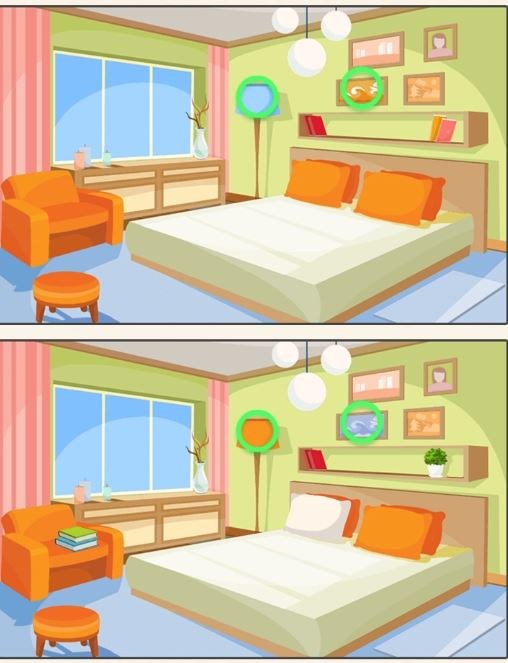
First 90 Seconds: Quiet Panic in a Split Screen I clicked into Find A Difference expecting the usual side-by-side images—a missing button on a coat, maybe a cloud that's slightly puffier on the left. What I got instead w
First 90 Seconds: Quiet Panic in a Split Screen
I clicked into Find A Difference expecting the usual side-by-side images—a missing button on a coat, maybe a cloud that's slightly puffier on the left. What I got instead was an almost immediate sense of low-grade dread, the kind where you know you're being timed but the clock hasn't actually appeared yet. The first pair of photographs loaded fast, two nearly identical shots of a cluttered desk. Coffee mug, scattered papers, a stapler, a pen resting at an angle. I stared for a good ten seconds thinking "these are literally the same image." Then I saw it: the pen on the right was black. On the left, dark blue. I tapped it and a soft chime confirmed I wasn't losing my mind. The timer in the corner had already eaten fourteen seconds. That's the game's real introduction—not a tutorial pop-up, just the creeping awareness that your pattern recognition is slower than you thought.
The art style isn't hand-drawn or cutesy. These look like stock photos run through a subtle desaturation filter, the kind of anonymous imagery that makes your brain work harder because nothing is stylized enough to jump out. A living room with beige walls. A fruit stand. A bookshelf where every spine blurs into the next. The mundane quality is intentional, I think. When everything is beige, a missing shadow or a slightly shifted object becomes genuinely hard to spot, and that's the whole point. The game doesn't want to charm you. It wants to see how long you can maintain focus before your eyes glaze over.
The Loop Tightens Faster Than You'd Expect
At its core, this is a spot-the-difference game with a progression system that punishes slowness more aggressively than most entries in the genre. You're presented with two images. You find five differences before a timer runs out. Find them, move to the next round. Fail, and you start over. That sounds forgiving on paper, but the timer doesn't reset between rounds—it just gets shorter. Round one might give you forty seconds. By round four, you're looking at twenty-two seconds for five differences, and two of them are going to be things like "a slightly thinner stripe on a sock" or "a curtain rod that shifted three pixels left."
What you're actually optimizing for isn't speed in the twitch-reflex sense. It's scan pattern efficiency. Most people, myself included, start by darting their eyes randomly between the two images, hoping a difference pops out through some kind of visual magic. That works for the first two rounds. After that, the game demands a systematic approach—top-left quadrant, sweep right, drop down, repeat. The players who last longest are the ones who build a mental grid and stick to it even when the timer starts flashing red. I caught myself whispering "quadrants, quadrants" under my breath during a particularly brutal kitchen scene where the only remaining difference was a missing reflection on a spoon. That's not a normal thing to mutter, but here we are.
The difficulty curve isn't smooth. There's a noticeable spike around round six where the differences shift from "object removed" to "attribute changed." A vase is still there, but it's slightly taller. A window still has curtains, but the fold pattern is different. These are harder to catalog mentally because your brain registers the object as present and moves on. You have to train yourself to check not just for presence but for version—is this the same lamp or a subtly different lamp? The game exploits a cognitive shortcut we all use, and the first time you miss a difference because you thought "yep, that's a chair" without checking the chair, you'll understand why round seven feels like a wall.
Mistakes That Send You Back to the Title Screen
I restarted this game more times than I'd like to admit, and the reasons fell into a few clear buckets. The first is what I'd call "confirmation tapping." You think you see a difference, you tap it, but you're slightly off—maybe you hit the wrong pixel on a patterned rug. The game registers it as a wrong tap. Too many wrong taps in quick succession and you lose time as a penalty, but in later rounds, even one wrong tap can cascade because the timer is already so tight. I developed a habit of hovering my finger (or cursor) for a half-second before committing, which feels unnatural but saved me from sloppy misclicks.
The second big mistake is staring at the center of the image. Human vision is drawn to the middle, but differences in this game love the edges. I lost count of how many times I found four differences quickly, then spent fifteen seconds scanning the central subject only to discover the fifth was a missing electrical outlet near the baseboard in the bottom-right corner. The game's designers clearly know about foveal bias and punish it. Now I actively force my eyes to trace the perimeter first, which feels wrong but works.
Third, and this is the one that still gets me: assuming a difference is too small to matter. Around round eight, the game introduces what I've started calling "micro-differences"—a single book on a shelf that's a slightly different shade of red, a shadow that's one degree less opaque. Your brain wants to dismiss these as lighting artifacts or compression noise. They're not. The game expects you to notice them, and if you've been breezing through earlier rounds by spotting big obvious changes, you'll hit this wall hard. I had to recalibrate my entire threshold for what counts as a meaningful visual discrepancy.
The fourth mistake is playing tired. I know that sounds obvious, but this game is uniquely sensitive to fatigue because it relies on sustained attention to detail. After about twenty minutes, my accuracy dropped noticeably. I'd miss things I would have caught easily ten minutes earlier. The game doesn't have a pause button that lets you walk away mid-round, so if your eyes are starting to cross, it's better to take the loss and start fresh later than to grind through diminishing returns.
Phone vs Desktop: A Real Difference in How You Scan
I tested this on both my phone and a laptop, and the experience diverges in ways that actually matter for performance. On a phone held at normal distance, the images are smaller, which sounds like a disadvantage but has an unexpected upside: your eyes can take in more of the scene at once, making side-by-side comparisons faster. The downside is that micro-differences become genuinely hard to see without pinching to zoom, and zooming takes time you don't have in later rounds. I found myself bringing the phone closer to my face in round seven like a grandparent squinting at a menu, which is not a dignified look but did help.
On desktop, the larger screen makes details crisp and obvious, but the scan area is physically bigger, which means your eyes have to travel farther between corresponding points in the two images. That travel time adds up. I experimented with sitting farther back to shrink the effective image size, which helped a little, but then I lost some of the fine-detail clarity. The sweet spot for me was a mid-size laptop screen at about arm's length, which felt like a reasonable compromise. I also noticed that using a mouse gave me more precise tap control than a finger on a touchscreen, which reduced my wrong-tap penalties significantly.
One thing the desktop version does that the mobile version can't: it lets you use peripheral vision to monitor both images simultaneously if you position yourself right. On a phone, you're basically looking at one image at a time, flicking back and forth. On a monitor, you can almost defocus and let differences pop out as anomalies in your peripheral field. It's a weird technique that takes practice, but I shaved a few seconds off my round times once I got the hang of it. Not a game-changer, but noticeable.
A Practice Plan That Doesn't Feel Like Homework
If you're the kind of person who wants to actually get better at this rather than just casually poking at it, I put together a short routine based on what worked for me. This isn't a training regimen from the developer—it's just what emerged after a lot of failed runs and a few surprisingly deep ones.
First, play three rounds with the explicit goal of not finishing. Instead, just scan the images using a strict grid pattern: divide each image into six zones mentally (top-left, top-center, top-right, bottom-left, bottom-center, bottom-right) and spend three seconds on each zone whether or not you see a difference. Don't tap anything. Just practice the eye movement. This feels stupid and slow, but it builds the muscle memory for systematic scanning instead of the chaotic darting that most people default to. I did this for about ten minutes across two sessions and noticed my round-one and round-two times dropped by almost half.
Second, play a few rounds where you deliberately look at the "boring" parts of the image first—baseboards, corners, ceiling edges, the gaps between furniture. Make yourself ignore the central subject entirely for the first ten seconds. This trains you to overcome the center-bias I mentioned earlier. You'll miss some obvious differences in the middle, and that's fine. The point is to reprogram where your eyes go automatically.
Third, set a timer for fifteen minutes and play normally, but stop the moment the timer goes off regardless of how well you're doing. This prevents the fatigue spiral where you keep playing worse and worse but refuse to quit because you're "almost" going to beat your high score. I found that sessions longer than fifteen minutes had steeply diminishing returns, and coming back fresh after a break consistently produced better results than grinding.
Finally, if you're stuck on a particular round structure—like the ones where differences are all attribute-based rather than object-based—try this: verbally describe each object in the left image to yourself before checking the right. "Red mug, handle on the left, chip on the rim." Then check the right: "Red mug, handle on the left, no chip." The verbal encoding forces you to notice details your visual system would otherwise gloss over. It feels a little silly, especially if someone overhears you muttering about mug handle orientation, but it works.
The game lives in that strange space where it's technically casual but demands a level of attention that doesn't feel casual at all. You can play it for free in your browser, which makes the barrier to entry nonexistent, but the skill ceiling is higher than most spot-the-difference games I've tried. It's the kind of thing you open thinking you'll mess around for five minutes and then suddenly forty minutes have passed and you're genuinely irritated at a photograph of a potted plant for having the wrong number of leaves. That's a compliment, mostly.



