
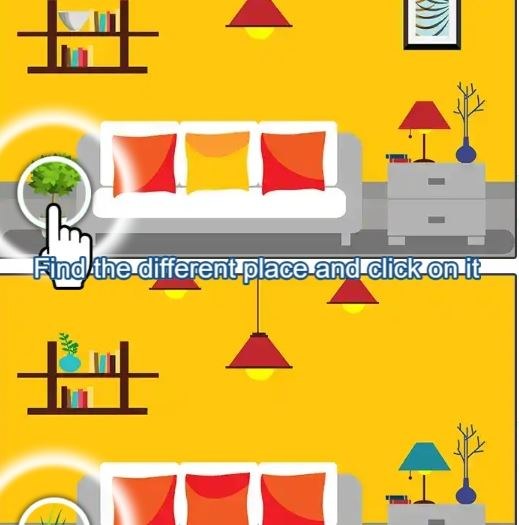
First Minute In: What You'll Actually See I loaded Find Difference 2024 expecting the usual split-screen photo comparison, and honestly, the first thirty seconds felt exactly like that. Two nearly identical images, a tim
First Minute In: What You'll Actually See
I loaded Find Difference 2024 expecting the usual split-screen photo comparison, and honestly, the first thirty seconds felt exactly like that. Two nearly identical images, a timer ticking down at the top, and me tapping on what I thought was a missing flower petal. But then I missed three times in a row, the timer penalty kicked in, and I realized this isn't a gentle spot-the-difference game where you can just poke around. The countdown is aggressive, and wrong taps cost you seconds—not lives, but actual clock. That changes the whole vibe. You stop scanning casually and start hunting with real intent.
The first minute teaches you that your eyes will lie to you. I spent a good ten seconds convinced a shadow was missing from a teacup, only to realize the difference was the handle shape entirely. The game trains you to stop trusting your first impression. What makes it stickier than I expected is the scoring system. You don't just pass levels; you build a streak multiplier that carries between rounds if you don't miss. Blow a tap, and it resets. That multiplier is what separates a forgettable score from one that makes you want to post a screenshot somewhere.
What You're Actually Optimizing For
The core loop isn't really about finding all five differences. Any patient person can do that eventually. What you're chasing is the combo chain. Every correct tap adds to a multiplier that juices your final score, and the multiplier only holds if you nail differences back-to-back without a single wrong tap. Miss once, and you still finish the level, but your bonus evaporates. That's the quiet tension running under every round.
So your brain splits into two modes: scanning mode, where you're just comparing images methodically, and execution mode, where you've spotted something and need to tap precisely. The trouble is that switching between those modes costs time, and the clock doesn't care. I found myself rushing the tap on differences I was only 80% sure about, because waiting another three seconds to confirm might cost me the same multiplier anyway if the timer runs low. You start doing mental math about whether a risky tap is worth preserving the streak versus playing it safe and rebuilding from scratch next round.
There's also a hidden rhythm to how differences are placed. They're not randomly scattered. After about fifteen minutes, I started noticing that the game loves to hide one difference near the edges of objects where color gradients shift, another in background clutter, and frequently one in the pattern of textiles or wallpaper. Once you internalize those categories, your scanning speed jumps noticeably. That's the real skill curve—not your eyesight, but your pattern recognition for where the designers tend to tuck things.
Mistakes That End Runs Early
Let me walk through the specific ways I torpedoed good runs, because they're avoidable once you name them.
Confirmation tapping. This one killed me repeatedly in my first ten minutes. I'd spot a difference, feel about 90% sure, and then hesitate with my finger hovering. That hesitation made me second-guess, tap a nearby area "just to check," and eat the penalty. The game punishes exploratory tapping hard. If you're not sure, it's almost always better to wait and scan elsewhere than to guess. The penalty isn't just the lost seconds—it's the multiplier reset, which hurts your final score more than the clock loss.
Edge blindness. Several differences hide right where two objects meet, like where a curtain touches a windowsill or where a character's sleeve overlaps a table. Your eye naturally treats those borders as one continuous shape, so the missing button or shifted seam doesn't register. I started training myself to deliberately trace outlines with my eyes before scanning interiors, and my accuracy improved within the same session.
Timer panic. When the clock dips below ten seconds, something ugly happens to your fine motor control. I caught myself tapping the same wrong spot three times in a row because my finger was jabbing instead of pressing. The game doesn't need speed-tapping; it needs deliberate taps. If you feel the panic rising, take one full second to exhale and look at the image with soft focus. Sounds absurd for a browser game, but it works. The timer isn't so tight that you can't afford a pause—it's tight enough that flailing guarantees failure.
Ignoring color temperature. A lot of differences aren't about objects missing but about hues shifting slightly. A blue vase becomes teal, or a warm lamp light turns cool. Your brain corrects for lighting automatically in real life, so you gloss over these unless you actively look for them. I started asking myself "is anything the wrong shade?" on each new pair, and that question alone caught two differences per level that I'd been missing before.
Phone vs Desktop: It Matters Here
I played on both a laptop trackpad and a phone screen for about twenty minutes each, and the experience splits in ways worth knowing before you commit.
On desktop, the larger screen is a genuine advantage. Differences that rely on fine detail—stitching on fabric, small text changes, reflections in glass—are much easier to spot when the image fills a monitor. The downside is that using a mouse or trackpad introduces a tiny delay between deciding and clicking. That delay is negligible for casual play, but when you're trying to chain five rapid correct taps to preserve a multiplier, the phone's direct touch feels faster and more connected. I found my combos were easier to maintain on mobile, even though I spotted differences more slowly.
On phone, the smaller screen condenses the image, which ironically helps with comparing overall composition. Differences that involve proportion or spacing jump out faster because the whole scene fits in your field of view without scanning. But text-based differences and subtle color shifts are harder. I had to squint at a bookshelf for a solid minute on mobile before realizing one book spine was a slightly different red. On desktop, I'd have caught it in seconds.
Also worth noting: on mobile, your finger physically covers part of the image when you tap. If you're right-handed and the difference is in the lower right corner, you might obscure it while reaching. I missed a difference twice because my own thumb hid it. Desktop doesn't have that problem, though a cursor can similarly block small details if you're not mindful.
If you care about high scores and combos, I'd say mobile gives you a slight edge in tap speed, while desktop gives you an edge in discovery. Neither is broken. Just know which tradeoff you're making.
A Short Practice Plan That Actually Builds Skill
After messing around for a while, I settled into a practice routine that felt productive rather than just grinding. This isn't a "play every day" speech—it's more about how to spend your first few sessions so the game opens up faster.
Session one: No-tap scanning. Load up the first few levels and don't tap anything. Just look. Let the timer run out. Your only goal is to find differences with your eyes and mentally note them. This strips away the performance pressure and lets you study how the game hides things. You'll start seeing the categories I mentioned earlier—edge differences, color shifts, missing background elements. Do this for ten minutes. It sounds boring, but you're building a mental library of tricks the game reuses constantly.
Session two: Slow combo focus. Now play normally but with one rule: you only tap when you are absolutely certain. If the timer runs out, fine. The goal here is to complete at least three levels in a row without a single wrong tap, even if you only find two or three differences per level. This trains the discipline to avoid confirmation tapping. You're rewiring the impulse to poke at hunches.
Session three: Speed awareness. Once you can play clean, start paying attention to your scan pattern. Most people scan left to right, top to bottom, like reading. That's fine, but the game sometimes clusters differences in ways that reward a different path. Try starting from the center and spiraling outward, or focus on the most detailed quadrant first. See which pattern yields faster discovery times for you personally. There's no universal best pattern—only the one that matches how your eyes naturally track detail.
Ongoing: Category drilling. Every few sessions, pick one difference category and hunt it exclusively for a level. Tell yourself "this round I'm only looking for color mismatches" or "only edge differences." You'll still find others by accident, but this narrows your attention and speeds up your recognition of that specific type. Over time, you stop consciously categorizing and just see them.
I noticed real improvement after about three sessions of this. Not dramatic "I'm a genius now" improvement, but my average combo chains got longer and my wrong taps dropped to maybe one every few levels instead of several per level. For a game that lives in a browser tab and costs nothing to play, that kind of tangible progress feels surprisingly satisfying.
The game won't revolutionize your life, and it's not pretending to. But as a focused little observation trainer that rewards clean play over frantic tapping, Find Difference 2024 carves out a niche that most spot-the-difference games ignore. The combo system gives you a reason to care about precision, and once you start chasing those perfect streaks, it's hard to go back to playing sloppy.



