
First Tap, First Impression I opened Find Differences on my phone during a commute and within twenty seconds I was squinting at two nearly identical bathroom scenes. One had a yellow rubber duck, the other didn't. Tap. A
First Tap, First Impression
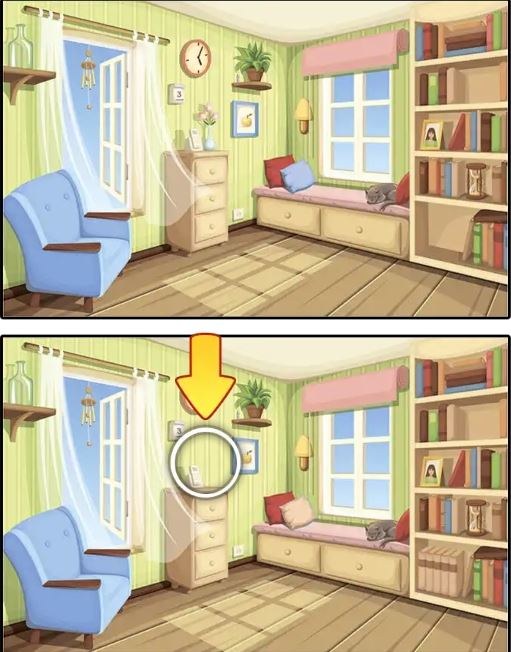
I opened Find Differences on my phone during a commute and within twenty seconds I was squinting at two nearly identical bathroom scenes. One had a yellow rubber duck, the other didn't. Tap. A satisfying little pop, a circle marking the spot, and a counter ticking up from zero. The first minute feels generous—the differences are obvious enough that you think you're good at this, and the timer hasn't started feeling mean yet. You get that tiny dopamine hit of spotting the missing toothbrush or the flipped book on the shelf. I settled into my seat, thumb hovering, and figured I'd play one round. Fifteen minutes later I was still there, hunched over the screen, refusing to use a hint on a level where a teapot handle had changed color by maybe two shades. That's the quiet trap here. It starts gentle and then the difficulty curve quietly ratchets up until you're questioning your own eyesight.
The Loop That Keeps You Tapping
The core loop is deceptively simple. You get two images side by side—or stacked vertically on a phone—and a set number of differences to find. Usually five to seven per scene. A timer runs, but in the early levels it's generous enough that you don't panic. As you progress, the differences get subtler. We're talking about a lamp cord that's slightly longer, a cloud that's missing one curve, a shadow that falls the wrong direction. The game doesn't punish you immediately for a wrong tap. You might get a short penalty timer freeze or a small deduction from your score, but it's not one of those games that ends your session for one mistake. You're optimizing for speed and accuracy. A perfect run means tapping all differences without any wrong pokes, which gives you a star rating at the end. Three stars on every level is the quiet goal that keeps completionists locked in.
The level structure is linear. You clear one scene, the next unlocks. There's no overworld map or story holding it together—just a series of increasingly tricky illustrations. The scenes themselves are pleasant, a bit generic: kitchens, parks, living rooms, beach views, street markets. The art style is clean, slightly flat, with enough visual clutter to hide things in plain sight. You'll find yourself scanning methodically. Left to right, top to bottom, comparing edges of objects. After a few levels, your brain starts building a checklist: check reflections, check patterns on fabrics, check items on shelves, check the background.
How the Difficulty Actually Unfolds
Around level ten, I noticed the game stopped putting differences in the obvious center of the frame. Early on, the missing item might be a large fruit bowl or a bright red bicycle. By the mid-teens, differences migrate to the edges. A slightly different window frame. A missing leaf on a potted plant tucked in the corner. The color changes become more diabolical too. Not just "this apple is green instead of red" but "this apple has a highlight that's one pixel off." The game leans hard into what I'd call camouflage differences—objects that blend into busy backgrounds. A striped towel where one stripe changes color, but the whole thing sits on a striped beach chair. You'll stare right through it three times before your brain catches the discrepancy.
Then there's the scale trick. Some differences involve objects that are tiny. A button on a coat. A distant bird in a sky full of similar birds. On a phone screen, these become genuinely challenging. I found myself pinching to zoom constantly, which the game allows, but zooming introduces its own problem—you lose context. You're so close to one corner of the image that you forget what you've already checked, and you'll re-scan the same area twice. The game knows this and deliberately places one final difference in a spot you swore you already cleared.
Mistakes That End Runs Early
I burned through a lot of rounds before I figured out what was actually costing me. The biggest mistake is panic-tapping. When the timer hits under thirty seconds and you still need two differences, your thumb gets twitchy. You start tapping anything that looks slightly off. The game usually penalizes wild tapping with a brief lockout—maybe two or three seconds where you can't tap at all—and that's fatal when you're racing the clock. I lost a level multiple times because I got impatient, tapped a lamp that was identical in both images, and sat frozen while the timer bled out.
Another mistake is fixating on one quadrant. Your eyes naturally gravitate to the most colorful or busy part of the image, and you'll spend forty seconds combing through a kitchen counter while the real difference is a missing picture frame on the far wall. I started forcing myself to do a quick whole-image scan before zeroing in on details. Even then, I'd miss things. The third common mistake is ignoring subtle color shifts. Your brain corrects for lighting, so if one image is ever-so-slightly warmer in tone, a pale yellow vase might look identical to a pale cream vase unless you're actively comparing hex values in your head. I learned to slow down and actively question anything beige, gray, or pastel.
Hints exist, but they're limited. You might get three free hints and then have to watch an ad to replenish. I hoarded hints for the final difference on hard levels. Using a hint early feels wasteful because the first three differences are usually findable with patience. Blowing a hint on difference two of seven is a trap. Save them for the last one, when you've been staring for two minutes and your eyes are glazing over.
Phone vs Desktop: A Real Difference
I played on both my phone and a laptop, and the experience splits in meaningful ways. On desktop, you get the images side by side, large and crisp. You can see both scenes in peripheral vision and flick your eyes back and forth rapidly. Finding differences on a 15-inch screen feels almost leisurely. The timer is still tight on later levels, but you're not fighting the form factor. On mobile, the images stack vertically. You scroll up and down, which breaks your visual memory. By the time you scroll back up, you've forgotten the exact placement of that flowerpot. I found myself doing this awkward scroll-jerk motion—flicking up, flicking down, flicking up—trying to hold the image in short-term memory. It's harder, and I think the mobile version is where the game actually earns its difficulty.
Touch controls are precise enough. Tapping registers cleanly, and the hitbox for differences is reasonably forgiving. You don't need pixel-perfect accuracy. But your finger itself becomes an obstacle. On a small screen, your thumb covers a chunk of the image while you're tapping, so you might miss that the difference you just found was adjacent to another subtle one. I started using my pinky to tap on harder levels just to keep more of the screen visible. That's not a complaint—I actually enjoyed the physicality of it—but it's worth knowing if you're struggling. The game is free in browser, no download needed, so hopping between phone and desktop is trivial if you want to compare. I ended up preferring phone because the added friction made small victories feel more earned.
What You're Actually Practicing
This isn't just a spot-the-difference game. You're training a specific kind of systematic visual search. After a week of daily play, I noticed I was getting faster at scanning real-world scenes too. Walking through a grocery aisle, I'd clock that one cereal box was flipped backward. That sounds absurd, but the skill transfers. The game rewards a calm, methodical approach. Freaking out and tapping wildly never works. The players who three-star every level aren't the ones with the best eyesight; they're the ones who built a mental checklist and stick to it under time pressure.
You also learn to trust your gut on "something feels wrong." Often I couldn't articulate what the difference was—I just felt a slight visual dissonance in one area. Tapping that hunch usually paid off. The brain processes visual mismatch faster than conscious thought can name it. Leaning into that instinct is a real skill the game sharpens.
A Short Practice Plan That Helped Me
If you want to improve without burning out, here's what I settled into after a couple weeks. Play three levels a day, no more. The first level should be one you've already cleared—replay it and try to beat your time. This warms up your scanning pattern without the frustration of new content. The second level should be your current progression level, played cold with no hints. Accept whatever star rating you get. The third level is a replay of that same level immediately after, aiming for a better time now that you know where at least some differences hide. This repetition builds visual memory for the specific tricks that level uses, and those tricks recur in later scenes. Same artist, same hiding habits.
On the technical side, if you're on mobile, turn up your screen brightness. A lot of the late-game differences involve dark objects on dark backgrounds, and a dim screen makes them nearly invisible. I also recommend playing in landscape mode if the game supports it—some mobile versions lock portrait, but if yours rotates, landscape gives you a slightly wider view and less scrolling. Use hints only on the final unfound difference. If you've found four of five and you're stuck, that's when a hint prevents a full restart. Any earlier, and you're burning a resource you'll wish you had later.
One last thing: the game does show ads. They're the standard free browser game fare—banner at the bottom, occasional full-screen between levels. Not egregious, but noticeable. I found the interruption actually served as a natural break point. I'd finish a level, an ad would pop, and I'd use that moment to rest my eyes. You can play for free as long as you want, and the ad frequency didn't ramp up in an annoying way during my sessions.
Find Differences doesn't reinvent anything. It's exactly what the title says, executed cleanly enough that the core hook works. The difficulty curve is well-tuned for short sessions, and the mobile experience, while slightly harder than desktop, adds a tactile element that kept me engaged longer than I expected. If you enjoy visual puzzles and have fifteen minutes to kill in a browser, it's worth a look. Just don't be surprised when you start noticing missing buttons on people's coats in real life.



