
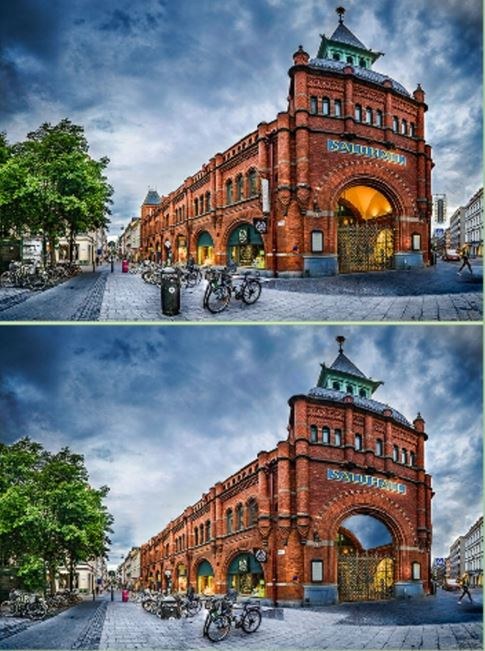
First Minute on the Timer I clicked into Findthedifferencebest expecting the usual side-by-side photo shuffle, but the first thing that hit me was the silence. No cloying music, no mascot bouncing at the edge of the scre
First Minute on the Timer
I clicked into Findthedifferencebest expecting the usual side-by-side photo shuffle, but the first thing that hit me was the silence. No cloying music, no mascot bouncing at the edge of the screen, just two nearly identical images and a countdown clock already ticking. The first scene was a cluttered kitchen counter—mugs, scattered utensils, a leaning stack of plates. My cursor hovered over a ladle that looked slightly bent. I clicked. Correct. A soft chime, a tiny green circle appeared over the spot, and the clock added back three seconds I didn’t know I’d already lost. That little time-buyback mechanic changes the texture of the whole game. You’re not just spotting mismatches anymore; you’re managing a slippery resource that drains faster when you hesitate.
Within 90 seconds I’d cleared the level, but my heart was beating a bit faster than it should for a browser game. The differences weren’t hidden in the usual places. One was a faint reflection missing on a metal teapot. Another was a shadow under a plate that had shifted direction. This wasn't a game content to hide a stripe on someone's shirt. It wanted me to notice spatial relationships and light logic, not just color swaps. I immediately restarted the same level to see if the differences would randomize. They didn't, but my approach did. That's when I realized Findthedifferencebest is less about seeing and more about scanning with intent.
How the Loop Actually Works
On the surface it’s a classic spot-the-difference chain. Two panels, a finite set of discrepancies, tap them all before the clock runs out. But the loop has teeth because of how the timer behaves. You start each level with a generous chunk of seconds—usually between 45 and 90 depending on difficulty—but the drain is constant and unforgiving. Every correct tap returns a tiny bonus, something like two to four seconds. Every wrong tap, and these are easy to make when you get jumpy, lops off a penalty chunk that’s noticeably larger than the reward. Maybe six or seven seconds gone for a single misclick. The asymmetry is deliberate. It means you can’t brute-force levels by clicking everywhere. You have to be precise, or the run ends before you reach the last two differences.
What you’re optimizing for shifts as you climb. In early levels, you’re just building the visual vocabulary: knowing that the developers favor subtle hue changes on background objects, stretched shadows, missing highlights, and occasionally a flipped element that doesn’t announce itself. By the time you reach the higher-skill habits I’m going to talk about, you’re not looking for differences anymore. You’re scanning for absences. Something that should cast a reflection but doesn’t. A texture that breaks a repeating pattern. The moment I stopped asking “what’s different?” and started asking “what’s wrong here?” my accuracy jumped and the penalty clicks dropped to nearly zero.
The game doesn’t tutorialize any of this. It drops you in and expects you to fail forward. I respect that. After a few runs, you’ll notice the levels are grouped in vague thematic buckets—household scenes, outdoor markets, cluttered workshop tables—but the visual density increases in a way that feels more like a photographer’s portfolio than a game designer’s level map. There’s no story, no unlockable narrative. The progression is purely your own skill curve, and the game is comfortable letting that be enough.
Mistakes That End Runs Early
I burned through my first six or seven attempts making the same cluster of errors, and I see other players doing them too when I watch over a shoulder. The first is what I call anchor-clicking. You find one difference, feel the relief of the chime, and then your eyes stay glued to that same quadrant of the image. You start hunting millimeter variations around the spot you just clicked, convinced the developer clustered differences nearby. They almost never do. Findthedifferencebest spreads its discrepancies evenly across the frame, and lingering in one zone drains the clock while you squint at nothing. I started forcing myself to physically look at the opposite corner after every correct tap. It felt unnatural, but my clear times dropped by a third.
The second run-ender is misclick panic. You tap a spot you were certain about, hear the harsh buzz of a wrong answer, and immediately tap two more times in the same area hoping to correct it. The penalty stacks. Three wrong taps in rapid succession can vaporize fifteen seconds, and on a 50-second level that’s catastrophic. I’ve lost runs with only one difference remaining because I got twitchy and clicked a shadow that was actually just a shadow. The fix is embarrassingly simple but hard to internalize: after a wrong tap, lift your hand off the mouse or take your finger off the screen for a full second. Let the visual reset. The timer is your enemy, but panic is the timer's best friend.
A third, sneakier mistake is ignoring the "almost" differences. The game loves placing elements that are 95% identical but with a single edge softened, a slight size reduction, or a color that's only two hex values off from its twin. In a market scene, I stared at two hanging lanterns for twenty seconds because they were the same shape and same warm orange. But one had a tiny metal cap on top and the other didn't. The cap was maybe eight pixels wide. I only caught it because I stopped looking at the lanterns and started looking at the negative space between them. High-skill play here means treating the entire canvas as suspect, even—especially—the boring background stretches where nothing seems to be happening.
Last one worth mentioning: fatigue scanning. Around the eight-minute mark, your eyes start accepting "close enough" as identical. You'll glaze over a missing button on a coat or a book spine that's a slightly different width because your brain wants to conserve energy. I set a personal rule to take a 30-second break every three levels, even if I'm on a streak. Staring at a blank wall or out a window resets my contrast sensitivity enough that when I come back, the remaining differences seem to pop out of the image like they're under a spotlight.
Phone vs Desktop: Where the Difficulty Lives
I tested Findthedifferencebest on a 24-inch desktop monitor and a mid-size Android phone, and the experience splits in ways that matter for advanced play. On desktop, you have the luxury of a large canvas and a precise cursor. You can hover over suspicious areas without committing, which lets you compare tiny details without risking a penalty click. The timer feels slightly more generous because your eye can dart across the full image in a fraction of a second. I found myself developing a scanning grid pattern: top-left to bottom-right in a Z-shape, then a quick reverse sweep for anything I missed. That methodical approach only works with a mouse and a screen big enough that both panels sit fully in your peripheral vision.
On a phone, the game condenses the two images into a stacked or side-by-side layout that requires scrolling or at least constant focal shifts. You can't see both panels in crisp detail simultaneously. Pinching to zoom is available but awkward under time pressure—every pinch costs a second or two, and the touch target for differences is less forgiving. I misclicked far more often on mobile, not because I couldn't see the difference, but because my thumb landed a few millimeters off and the game registered it as a wrong tap. The penalty stings worse on a small screen because rebuilding lost time is harder when your input method is inherently less precise.
That said, mobile has one weird advantage: proximity. Holding the screen closer to your face lets you catch micro-differences that might blend in from two feet away on a monitor. I spotted a missing screw on a cabinet hinge on my phone that I'd overlooked three times on desktop. If you're serious about pushing into higher-difficulty habits, I'd recommend practicing on both. Desktop builds your scanning discipline and rhythm. Mobile sharpens your attention to pixel-level detail. Alternating between them kept my brain from settling into one comfortable detection pattern, which is exactly where plateaus come from.
Building a Practice Routine That Sticks
After about fifteen hours with the game spread across a couple weeks, I stumbled into a practice structure that felt sustainable and actually moved my skill ceiling upward. It's not a grind; it's more like targeted drills that address specific weaknesses the game exposes. I'll lay it out plainly in case it helps someone else skip the flailing phase I went through.
Start with a warm-up level you've already cleared, but play it with a constraint: you're not allowed to click anything for the first fifteen seconds. Just look. Move your eyes in a deliberate pattern—I use a clockwise spiral starting from the center—and mentally note every candidate difference without acting on any of them. This feels agonizing while the timer ticks down, but it forces you to build a mental map of the scene before you commit. When you finally start clicking, you'll be faster and more accurate because you're not discovering the image in real time. You already know where the trouble spots are.
Next, pick a level that gave you trouble and replay it three times in a row, but with a different scanning priority each run. First run: look only for color differences. Ignore shape, ignore size, ignore missing objects. Just hue shifts. Second run: look only for missing or added objects. Something that exists in one panel but not the other. Third run: look only for spatial distortions—stretched shadows, rotated elements, reflections that point the wrong way. This compartmentalized approach feels clunky at first, but it trains your visual system to categorize discrepancies instead of treating them all as a vague blob of "something's off." After a week of this, I started noticing that my brain would automatically flag a difference as "color" or "absence" before I consciously identified it.
The third drill is the hardest and the one that produced the biggest leap for me. Take a screenshot of any level mid-play. Open it in a basic image viewer outside the game, no timer, no pressure. Study it until you find every difference, then close the image and open the actual level. Play it fresh. The differences are the same, but now you've primed your pattern recognition without the adrenaline. Over time, you'll start noticing that certain types of differences recur across levels—the same developer fingerprints. A particular way they handle reflections on glass. A tendency to alter the spacing between parallel lines. Recognizing those signatures speeds up every future level because you're not solving each scene from scratch; you're reading a visual language you've already begun to learn.
I also started keeping a tiny mental log after each session. Not written down, just a thirty-second recap: which difference took me the longest to find, and why. Usually the answer was "I assumed it would be in the focal point of the image and it was in the blurred background instead" or "I was looking for a color change and it was a shape change." That self-audit takes almost no time and it prevents me from repeating the same blind spots. The game doesn't track your mistake patterns, so you have to do it yourself if you want to improve deliberately rather than just grinding levels.
One last thing: resist the urge to play for more than twenty minutes in a single sitting. Visual search is cognitively draining in a way that's easy to underestimate. After the twenty-minute mark, my error rate climbs sharply even if I feel fine. I set a timer for myself and when it goes off, I close the tab, no matter how close I am to clearing the next level. Coming back fresh the next day, I often clear that same level on the first try with time to spare. The game rewards rested eyes more than stubborn ones. That's not a platitude—it's measurable in the difference between my Wednesday evening runs and my Saturday morning ones.
Findthedifferencebest is one of those rare browser games that doesn't need to be anything more than what it is. No meta-progression, no daily rewards, no energy systems. Just a clean, punishingly honest test of visual attention that gets deeper the more you put into it. The free browser format means you can drop in for a five-minute drill or a focused half-hour practice session without any friction, and that accessibility is part of why I keep coming back. If you're already clearing levels consistently and wondering where the next challenge is, the game won't hand it to you. You have to build it yourself, one scanning habit at a time.



