
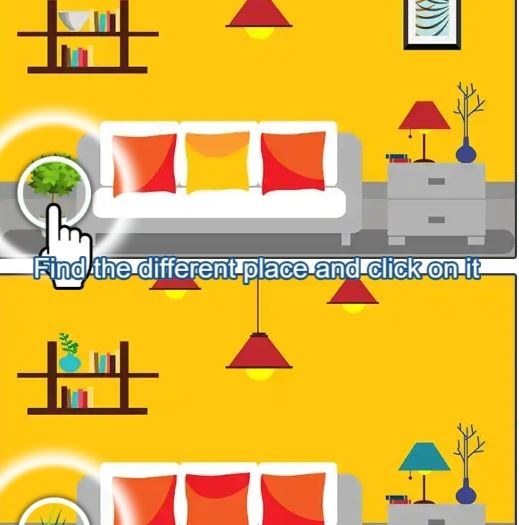
First Minute: Quiet, Then That Tiny Jolt You open Find Difference 2024 and the screen splits into two nearly identical photographs. A timer starts ticking in the corner, not obnoxiously loud, but persistent enough that y
First Minute: Quiet, Then That Tiny Jolt
You open Find Difference 2024 and the screen splits into two nearly identical photographs. A timer starts ticking in the corner, not obnoxiously loud, but persistent enough that you feel it. My first thirty seconds were a blur of darting eyes—curtain folds, window reflections, the pattern on a coffee mug. I tapped a spot that looked slightly off and the game rewarded me with a satisfying little circle and a soft chime. Then I promptly spent another forty seconds staring at a lampshade, absolutely convinced the fringe was different, only to realize I was zoomed in on a dust speck on my own screen. That’s the loop in a nutshell: quick bursts of triumph, followed by humbling, squinty frustration.
The art style leans toward crisp, bright still lifes—think living rooms, garden scenes, busy market stalls. Nothing grim or overly stylized. The objects are everyday enough that your brain tries to process them casually, which is exactly what makes the differences slippery. You’ll find yourself whispering “that vase wasn’t blue” to nobody in particular.
What You're Actually Optimizing For
On the surface, you’re spotting differences between two side-by-side images before time runs out. But after fifteen minutes, it becomes clear you’re really managing a hidden accuracy tax. The game tracks mistakes. Every wrong tap subtracts from a star rating at the end of the level, and if you dip below one star, you repeat the scene. That changes the whole feel. You can’t just jitter your finger around the screen hoping to graze a hitbox. You have to be deliberate.
There’s a hint button, but the game is stingy with it. You get a small handful for free, and then you’re watching a short ad if you want more. I found myself hoarding hints like a survival resource, only using them when a level had a single difference left and my eyes had gone blurry. The scoring system also rewards speed, so the real sweet spot is finding the first three or four differences quickly without slapping the screen like a maniac. That gives you a cushion of time and a higher accuracy bonus, which feels genuinely good to pull off.
Levels are grouped into themed packs, and each pack unlocks progressively. There’s no energy system I ran into, which is a relief. You can fail a level five times in a row and just keep retrying. The only gate is your own patience.
Mistakes That End Runs Early
The most common way I tanked a run wasn’t missing a difference—it was tapping too fast on an area where I was only sixty percent sure. The penalty isn’t a gentle nudge; three or four wrong taps in rapid succession can drop your accuracy low enough that even finding all differences leaves you at two stars. If the unlock requirements for the next pack demand three stars on a certain number of levels, you’ve just wasted a clean run.
Another trap is fixating on one quadrant of the image. Our eyes naturally drift to the center and upper left, but the developers clearly enjoy hiding changes in bottom-right corners, partially obscured by foreground objects. I lost a solid minute once ignoring a half-eaten apple in the bottom edge because I was convinced the difference had to be in the bookshelf. Scanning in a deliberate Z-pattern—top left to bottom right—cut my time nearly in half once I forced myself to do it.
Also, don’t ignore color temperature shifts. Some differences aren’t object additions or removals, but subtle hue changes. A scarf that’s mustard yellow on one side and pale lemon on the other. On a dim phone screen, that’s almost invisible. Which brings me to the device you’re playing on.
Phone, Desktop, and the Brightness Thing
I played primarily on a mid-range Android phone, and then switched to a laptop browser for comparison. The experience splits pretty hard.
On a phone, the pinch-to-zoom is essential. The game supports it smoothly, and you’ll be doing it constantly. The downside is your finger covers part of the screen when you go to tap, which occasionally leads to mis-taps on adjacent spots. I developed a habit of zooming in, lifting my finger, visually confirming the target, then tapping with my index finger held more vertically. Sounds fussy, but it saved my accuracy.
On desktop, you have a mouse pointer, which is inherently more precise. The images stretch wider on a monitor, and the larger field of view means you can often catch peripheral differences without scanning as methodically. The trade-off is that zooming requires a scroll-wheel or clicking a magnifying glass icon, and it felt slightly clunkier than the two-finger spread I was used to. If you’re chasing three-star ratings and you have the option, a desktop screen with good contrast makes the lighter color shifts easier to spot. If you’re on a phone, crank the brightness. I can’t stress that enough. The difference between eighty percent brightness and a hundred percent was the difference between seeing a shadow variation and cursing at a seemingly identical pair of boots.
No download required for either platform—the site just loads the game in your browser. It held up fine on a spotty Wi-Fi connection, though the between-level ad breaks took a few seconds longer to resolve.
A Practical Practice Plan That Doesn't Feel Like Homework
If you want to get genuinely better without burning out, I stumbled into a rhythm that helped me clear a tricky seaside market pack without using a single hint.
Start with a warm-up on levels you’ve already three-starred. I know it sounds boring, but replaying a familiar scene lets you focus on scanning technique instead of panicking about the timer. Do two or three old levels and try to beat your previous time by ten seconds. You’ll notice your eyes settling into a pattern more quickly.
Next, tackle one new level with the sound on. The audio cues for correct and incorrect taps are distinct, and the wrong-tap buzz made me more aware of my trigger finger than the visual flash alone. I found I was tapping more carefully just to avoid hearing that grating little error tone.
After that, switch to a harder scene and deliberately play it twice. First attempt, just find the differences without caring about stars. Let yourself tap wrong. The goal is to learn where the tricky spots are in that specific image pairing. On the replay, you’ll have a mental map of three or four changes, and you can prioritize those quickly, then use your remaining time for the sneaky ones. This repetition sounds like cheating, but the game doesn’t randomize differences within a level, so it’s really just practicing the exact challenge in front of you.
Finally, put the game down when you feel your eyes crossing. I hit a wall at a nighttime cityscape where the differences were tiny pinpricks of light. I kept retrying and getting worse, my accuracy dropping each time. Came back the next morning and cleared it on the first try with two seconds left. Fatigue is real, and these images demand a surprising amount of visual stamina.
The game doesn’t demand any special skills, but it does reward a quiet, methodical approach that feels increasingly rare in free browser games. There’s no flashy combo system, no progression tree to grind. You just get better at looking, and that’s oddly satisfying. If you find yourself tapping the same wrong spot three times on a ceramic teapot, take a breath, zoom out, and look at the whole scene again. The difference is probably somewhere you’ve already dismissed.



